One photo31 secondsOriginal soundFree previewPrivate MP4Ready for TikTok & ReelsOne photo31 secondsOriginal soundFree previewPrivate MP4Ready for TikTok & Reels
How It Works
Three steps and a few minutes. You see yourself in the scene before you pay anything.
Step 1
1
Upload one photo
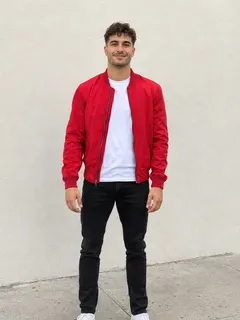
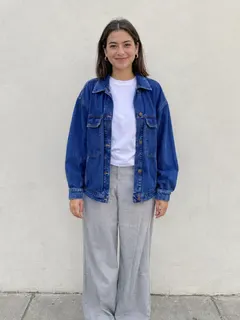
Head to shoes, face clear, no sunglasses. You, or a friend who said yes.
Step 2
2
See the free preview
A still of you in the farewell scene. No sign-up, no payment.
Step 3
3
Get the full video
31 seconds with the original sound. We email you when it is ready; download the MP4.
Every Shot Is You
Made from one photo. The three old friends, the two-tone car and the pier stay exactly as they are; only the young guy becomes you.
1The hand-offThey give you the game case.2The keysThe car is yours now.3One last gripA hand on your shoulder.4The tearsThe close-up everyone shares.5The drive awayYou get in and leave.
Photo Tips
A good photo is most of a good video.
Head to shoesYour outfit shows up in every shot.
Face the cameraFace sharp and in good light.
You, or a friend who said yesYour photo, your permission.
No sunglasses or hatsThe model needs to see your face and hair.
No group photosCrop to one person before uploading.
No celebrities or strangersMinors only with a parent or guardian.
Pay once, no subscription. The preview is always free.
1 video
Single
$9.90
1 video
31-second MP4 with the original sound
Private playback, download and delete
Most popular
3 videos
Trio
$19.90
3 videos
31-second MP4 with the original sound
Private playback, download and delete
5 videos
Squad
$29.90
5 videos
31-second MP4 with the original sound
Private playback, download and delete
One-time payments, no subscription. Unused credits never expire. If a video fails, its credits come back. A wholly unused pack can be refunded within seven days.
Before you pay
Nothing starts on its ownBuying credits never starts a video. You press the button when your photo is ready.
Failed videos are freeIf a render fails, the 10 credits come back to your account automatically.
Unused packs can be refundedA pack you have not used at all can be refunded within seven days.
Goodbye GTA 5 Video FAQ
What is the goodbye GTA 5 video?
It is the viral TikTok farewell on a sunset pier: three old friends hand the young guy a game case and the car keys, grip his shoulder, he cries and drives away. With Goodbye Five, that young guy is you.
How do I make my own goodbye GTA 5 video?
Upload one photo of you, check the free preview, then pay once for the full video. No app, no prompt and no editing.
How long is the video?
31 seconds (original 4:3 frame), the full original scene with the original sound, ready to post on TikTok, Reels or Shorts.
Is Goodbye Five free?
The preview is free and needs no sign-up. The full video is $9.90, or less per video in a 3- or 5-video pack. No subscription.
Does it work with photos of women?
Yes. Whoever is in your photo takes the young guy's place, with their own face, hair and outfit.
What photo works best?
One person, head to shoes, facing the camera, in good light. Avoid group shots, sunglasses, hats and tiny faces.
Will it look exactly like me?
It keeps your face, hair and clothes in every shot, but AI results vary from photo to photo. Check the free preview, and watch the whole video before sharing it.
Can I post it on TikTok?
Yes, it is your video. You are responsible for following the platform's rules on audio and rights when you post it.
What happens if a video fails?
The 10 credits reserved for it come back to your account automatically.
What happens to my photo?
It is stored privately and sent to the video provider only after you start generation. Photo drafts are deleted after 24 hours; videos stay in your account for 30 days.
Is Goodbye Five made by Rockstar Games?
No. Goodbye Five is an independent fan tool. It is not affiliated with, endorsed by or sponsored by Rockstar Games or Take-Two Interactive.
 Goodbye Five
 Your photo

 1
 2
 3
 4
 5